case · 2024 (C++ original), 2026 (TS/Tauri rewrite)
XCloud Condenser.
Role
Creator
Stack
- Tauri (Rust)
- Next.js
- TypeScript
- SteamGridDB API
- Steam VDF
XCloud Condenser
A desktop app that adds Xbox Cloud Gaming titles, and the streaming services you actually watch, to your Steam library, with proper artwork. Built twice: first in C++/Qt in 2024, then rewritten in Tauri + TypeScript in 2026 with Claude as a pair. Unreleased to the community at the time of writing.
TL;DR
The gap: the Steam Deck ecosystem treats games as first-class citizens and everything else as a hack. There's no first-class way to add Xbox Cloud Gaming titles to your Steam library, and no first-class way to add Netflix, Disney+, Prime Video or YouTube either. They all end up as awkward non-Steam shortcuts, sometimes via Flatpak Chrome, usually with no artwork.
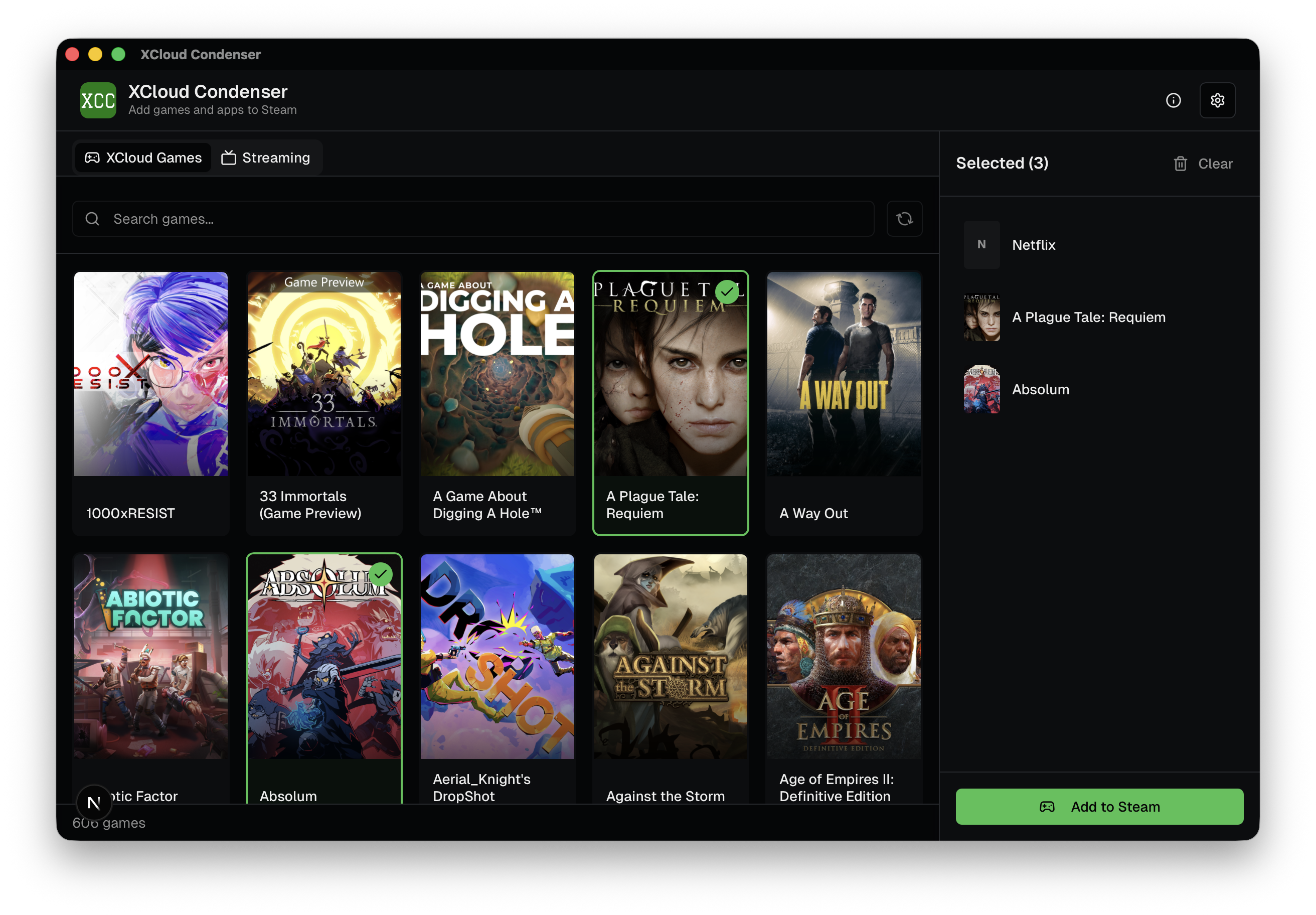
The tool: one app that does all of it, picks what you want from the live Xbox Game Pass cloud catalogue, ships with 15+ preconfigured streaming services, lets you add your own, writes real Steam shortcuts with proper grid / landscape / hero / logo artwork pulled from SteamGridDB.
The shape: Tauri (Rust backend, webview front end), Next.js UI, pnpm, AppImage for Linux / Deck and DMG for macOS. Signed builds with SHA256 checksums and GitHub build-provenance attestation.
The history: this is the second implementation of the same idea. The first was C++ + Qt in 2024. The rewrite in 2026 is the one that actually looks and feels right.
Why build it at all
The Deck experience is "everything is a Steam shortcut or it may as well not exist." Gamepad input, suspend/resume, overlay, friends list, Big Picture, those all work if the thing you're launching is a Steam shortcut. Xbox Cloud Gaming in a browser isn't. Netflix in a browser isn't. You can make them into shortcuts by hand, but you'll do it once, hate it, and stop.
This is the same observation that drove the Add to Steam work in chiaki-ng. XCloud Condenser is the same shape of tool pointed at a different source: instead of Remote Play, the Xbox Cloud catalogue and the big-name streaming services.
What it does
The app is two tabs.
XCloud Games
Fetches the Xbox Game Pass cloud gaming catalogue in two calls:
- Game IDs from
catalog.gamepass.com/sigls/v2. - Game details (title, images, metadata) from
displaycatalog.mp.microsoft.com/v7.0/products, batched 20 at a time.
Presents the catalogue in a browsable grid, lets you select which titles you want, downloads the matching artwork from SteamGridDB, and creates Steam shortcuts that launch each title straight in Chrome / Flatpak Chrome, no intermediate bash script, no .desktop file on the way through, just a direct shortcuts.vdf entry.
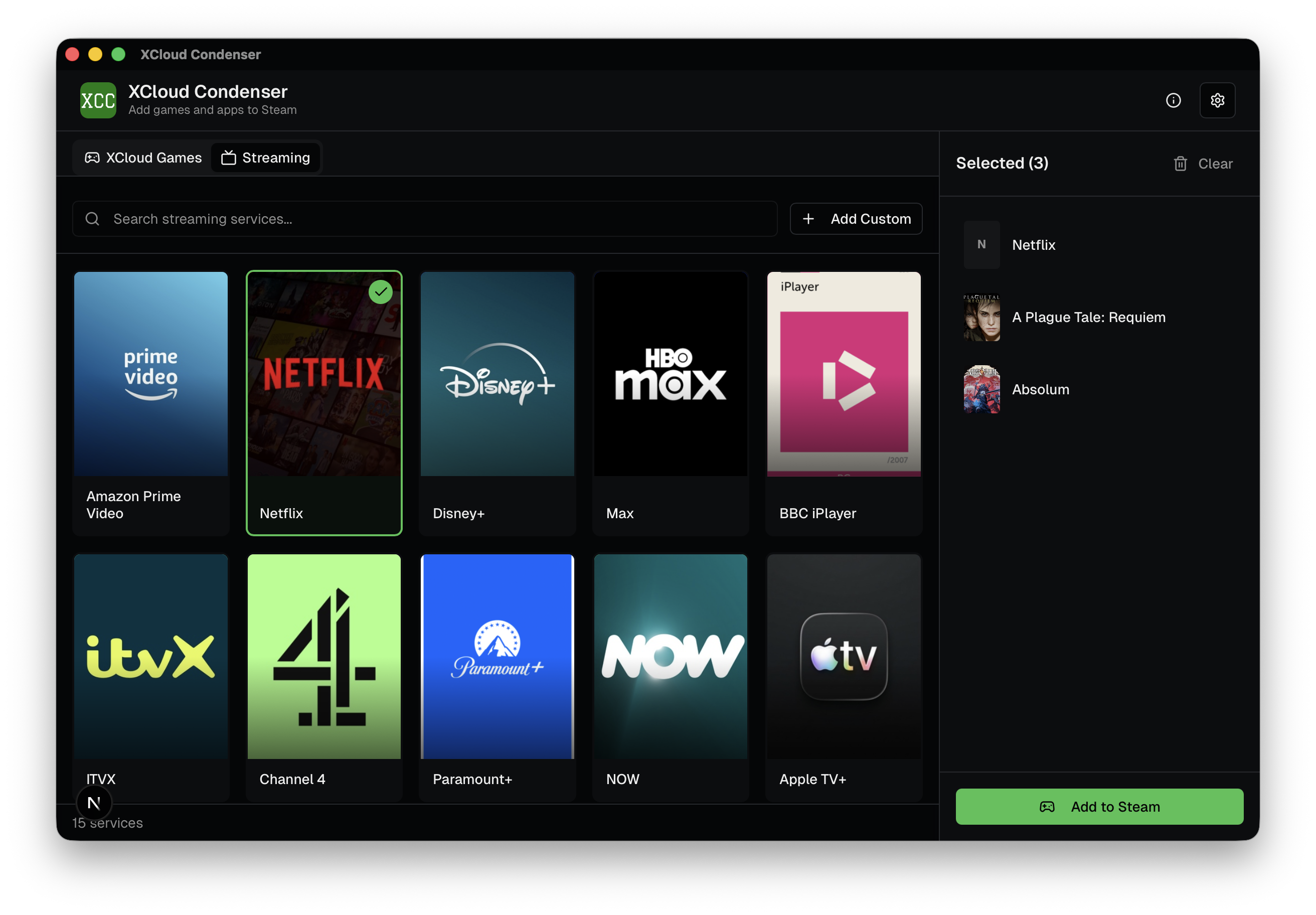
Streaming
Ships with 15+ built-in services, Netflix, Disney+, Prime Video, YouTube, etc., each with an optional pinned SteamGridDB ID so the artwork lookup is accurate rather than "top result for the string 'Netflix'." User-added services take a name, URL, and brand colour; artwork is looked up from SteamGridDB at creation time and stored alongside the service.
Same output path as the games tab: Steam shortcut, artwork files written into the Steam userdata directory, launch command pointing at Chrome.
Stack
| Layer | Choice | Notes |
|---|---|---|
| Desktop shell | Tauri | Rust backend, system webview, picked over Electron for size. A Tauri AppImage is in the 5–10 MB range; an Electron equivalent is ~100 MB. On a Deck, every binary is a bigger deal than on a laptop. |
| Frontend | Next.js + TypeScript | Claude's suggestion during the rewrite. If I'd been driving I'd have picked React + Vite, Next.js's routing and server machinery don't apply inside a Tauri webview, so the framework is pulling weight it doesn't need. The React layer on top is fine. |
| Package manager | pnpm | , |
| Artwork source | SteamGridDB API | Same source I used in the chiaki-ng work |
| Output | shortcuts.vdf + per-grid artwork in steam/userdata/<id>/config/grid/ |
Steam picks everything up after a restart |
Builds target macOS (.dmg) and Linux / Steam Deck (.AppImage). Windows is deliberately absent because I don't own a Windows machine, and shipping an unverified Windows binary for a tool that writes into a user's Steam config is not a thing I'm willing to do.
Releases include SHA256 checksums and GitHub build-provenance attestation so binaries can be cryptographically verified back to the source repo and workflow run:
gh attestation verify xcloud-condenser*.AppImage --repo Nikorag/xcloud-condenserThat matters more than it sounds, a tool that modifies Steam's user config is exactly the kind of thing people should audit before running, and provenance makes that tractable.
The C++ version, and why it died
The first attempt, in early 2024, was cpp-xcloud-condenser: the same idea, implemented in C++ with Qt, built on top of my own cpp-steam-tools library (itself extracted from the chiaki-ng work). It did the job. It was also, to me, ugly, and I didn't finish it.
Honest diagnosis of why the C++ version stalled:
- Qt aesthetics. Qt gives you something functional that looks like it was made by an accountant. For a consumer-leaning tool where the whole pitch is "this looks like a real Steam experience," Qt fighting me on every panel of polish was a bigger problem than it sounds.
- I lost interest. No dramatic blocker, no specific bug. A weekend tool that wanted a second weekend that never arrived.
It sat dormant for two years.
The 2026 rewrite
I came back to it in April 2026 and rewrote it from scratch in Tauri + TypeScript + Next.js, with Claude as a pair.
Honest division of labour:
- I wrote the Xbox Cloud Gaming API integration, understanding the two-call pattern against
catalog.gamepass.comanddisplaycatalog.mp.microsoft.com, shaping the types, handling the batched detail fetch. - I drove the product decisions, the streaming tab as a first-class idea rather than an afterthought; the 15+ built-in services with pinned SteamGridDB IDs for accurate artwork; the "restart Steam and your shortcuts appear" flow; the decision to launch directly in Chrome rather than via wrapper scripts.
- Claude wrote the rest. UI components, Tauri glue, build config, SteamGridDB client, the Steam VDF writing in TS.
Honest ratio: roughly 20 / 80, me / Claude, by lines of code. By decisions, more like 70 / 30.
I'm going to own that cleanly rather than fuzz around it. The product idea, the scope, the API reverse-engineering and the "what this should feel like" are mine. The implementation work on top is substantially Claude's, directed by me, reviewed by me, and still my responsibility. If the app corrupts your Steam config, that's on me, not on the tool that wrote half the code.
Why it's not in the wild yet
Two anxieties are keeping this in a private-ish state at the time of writing:
- iPlayarr taught me that publishing a tool means publishing an issue list, and I'm not sure I've got the bandwidth for a second one of those right now.
- "Vibe coding" has become a pejorative in parts of the OSS world in 2026, a bat to hit AI-assisted projects with. A tool that writes into a user's Steam config, built substantially by an LLM, is exactly the shape of thing that invites that review. I'd rather have the transparency about Claude's involvement in the case study first, the signed-provenance builds done, and then post it, than post it to a forum and be surprised by the reaction.
Neither of those is a reason not to ship. Both are reasons to ship carefully.
Links
- Repo (TS/Tauri): github.com/Nikorag/xcloud-condenser
- Repo (C++ original, archived in spirit): github.com/Nikorag/cpp-xcloud-condenser
- Steam shortcut library (C++ version only): github.com/Nikorag/cpp-steam-tools (the TS version writes VDF directly)
next case →
chiaki-ng (contributor)
My first contribution to someone else's open-source project. I was a Java developer who had never written C++ in my life. I picked it up as I went.