case · 2026
Jellybox.
Role
Creator (hardware, firmware, server, enclosure)
Stack
- Next.js 16
- NextAuth v5
- Prisma
- Neon PostgreSQL
- Tailwind
- Playwright
- ESP32 / Arduino
- PN532 NFC
- Waveshare eInk
- WS2812B NeoPixel
- TP4056
- 18650
- Tinkercad
Jellybox
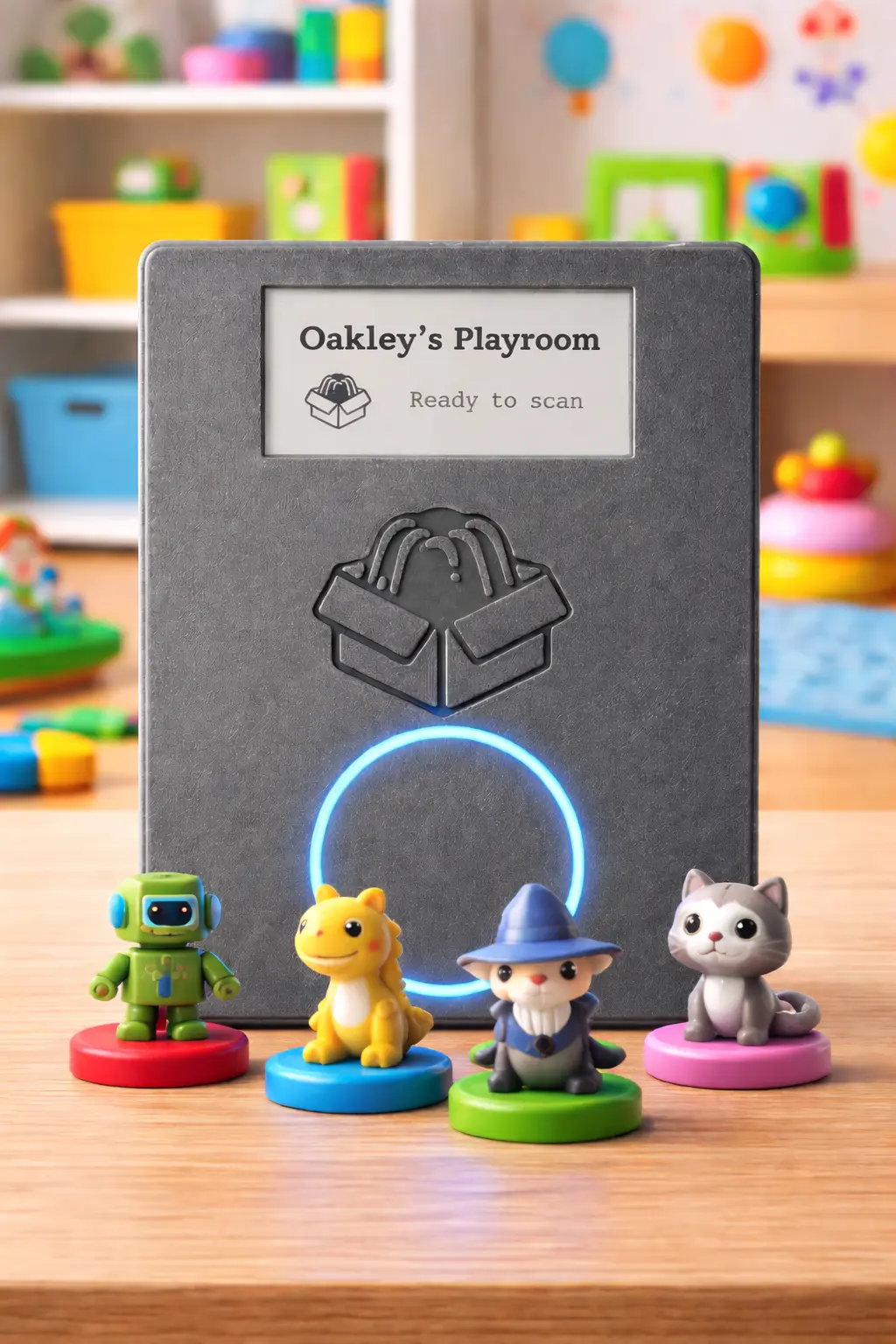
A Toniebox-shaped physical NFC player for my three-year-old son, Oakley, built on top of Jellyfin. Scan a disc, the living-room TV starts playing what's on it. No remote, no apps, no YouTube rabbit hole, no algorithmic feed, only the shows his parents have put on a disc.
My favourite project. Three pillars: a Next.js SaaS server, ESP32 firmware, and a 3D-printed enclosure. All three built twice, once as a scrappy proof of concept, once as the real thing.
Why
Oakley is three. He loves our Toniebox. He can't work a TV remote, and we didn't want to give him free rein of something like YouTube or Netflix. What we did want was for him to be able to choose from shows we'd already deemed safe, and start them himself, on the big living-room TV, without a parent being the bottleneck.
The Toniebox demonstrates the shape of the interface: a physical object you put on a box and a thing happens. What it doesn't do is let me serve him anything that isn't in the Tonies catalogue. He loves the Gruffalo. He loves Thomas. His current favourite is Hairy Maclary, an obscure 1995 New Zealand cartoon adaptation of the picture books, which no streaming service carries, and which lives on the Jellyfin server in my house.
Jellybox is what lets that happen.
The key architectural decision
Every DIY Toniebox-alike I looked at puts audio on the device: ESP32 + I2S DAC + MP3 decoder + speaker, stream-and-buffer locally. Jellybox very deliberately doesn't.
The Jellybox device is a stateless scanner with a screen and a light ring. It reads an NFC UID, posts it to the server, and shows the now-playing title on eInk. The server looks up what that UID maps to, picks a Jellyfin client (Chromecast, Jellyfin app on the TV, a receiver, parent's choice), and fires a PlayNow command at Jellyfin. Playback happens on the selected device.
We've already got a Toniebox for audio. Jellybox is specifically for visual content, Oakley's shows on the big TV, so the device doesn't need to be an audio device at all. Running it as a stateless scanner also buys:
- No audio stack on the ESP32. No codec headaches, no speaker supply chain, no "will it streaming-buffer-glitch on a weak wifi corner of the house."
- Reuse the existing living-room setup. We already have a TV, Jellyfin, a remote-capable client. The box turns that stack into something a toddler can drive.
- The whole-house option is free. Different Jellybox devices can point at different Jellyfin clients, one in the playroom pointed at the playroom TV, one in the bedroom pointed at a different speaker group.
- The device itself is cheap, quiet, small, cool-running, and has hours of battery life because all it does is sit there polling an NFC reader.
The architecture is the product. Oakley can't work a remote. He can press a disc onto the top of a box, and Thomas the Tank Engine starts playing on the telly.
The three pillars
Three repositories / bodies of work:
- Server, Nikorag/Jellybox-Server. Next.js 16 SaaS, the brain of the system.
- Firmware, Nikorag/Jellybox-Firmware. ESP32 / Arduino, the thing on the shelf.
- Enclosure, 3D-printed case + lid, CAD in Tinkercad, STLs alongside the firmware repo.
The server
Live at jellybox.nikorag.co.uk.
Stack
| Concern | Choice |
|---|---|
| Framework | Next.js 16 (App Router), React 19 |
| ORM / DB | Prisma → Neon PostgreSQL |
| Auth | NextAuth v5 (email/password, Google, generic OIDC) |
| Token encryption | AES-256-GCM via Node crypto |
| Validation | Zod (client + server) |
| Resend (verification, password reset) | |
| Testing | Jest + React Testing Library + Playwright E2E |
| Components | Storybook 8 |
| Hosting | Vercel |
| Styling | Tailwind, Jellyfin-inspired dark theme |
Data model, condensed
User, parent accountJellyfinServer, one per user, stores the URL + encrypted Jellyfin token + optional encrypted custom headers (so the Jellyfin server can live behind a Cloudflare Access / auth-proxy and still be callable)JellyfinClient, available playback targets (TVs, Chromecasts) on a Jellyfin serverExtension, system-wide, an admin-registered third-party HTTP service with cached manifest + encrypted bearer secret (see "Opening it up" below)ExtensionAccount, per(extension, user), the user's connection to an extension; stores only the opaqueaccountIdthe extension hands back at handshake time, never any provider tokensDevice, a physical Jellybox, has a bcrypt-hashed API key + adefaultClientpointerRfidTag, polymorphic: UID + label + either a Jellyfin item snapshot or(extensionId, externalItemId, externalItemTitle, …), plus playback options (resumePlayback,shuffle) that get forwarded to whichever backend the tag points atActivityLog, every scan, with snapshots of device name / tag label / item title so the log survives deletionsAccountPartner, co-parent access (see below)
The play endpoint
POST /api/play is where the whole thing happens. In order:
- Extract the
Authorization: Bearer jb_…key from the request. - Fast lookup by prefix, then bcrypt, the key prefix (
jb_+ 8 hex chars) is indexed in PostgreSQL; the bcrypt compare only runs against the tiny candidate set. - Check scan-capture mode (more on this below).
- Rate-limit check, a sliding window against
ActivityLogrows, no Redis required. - Per-device debounce (configurable grace period between scans; stops Oakley double-triggering by holding the disc on).
- Operating hours check,
Intl.DateTimeFormatagainst the user's timezone. Plays get 403'd outside the window. - Look up the tag and dispatch by source:
- Jellyfin tag → decrypt the Jellyfin token, find the live session matching the device's default client, fire
/Sessions/{id}/Playingwith aPlayNowcommand. - Extension tag → decrypt the extension's shared bearer secret, look up the device-owner's
ExtensionAccountfor that extension,POST /playto the extension with{ accountId, itemId, clientId, flags }. The extension is responsible for what playback actually means on its side.
- Jellyfin tag → decrypt the Jellyfin token, find the live session matching the device's default client, fire
- On
OFFLINEfrom either backend, optionally fire webhooks (e.g. "wake my receiver"), wait, and retry once, bounded by Vercel's request timeout.
Everything logs. Nothing stores a Jellyfin token or a third-party token in plaintext. A deleted tag's play history still reads as "Oakley played Hairy Maclary on Thursday at 4:12pm."
Co-parent access
Two parents, one shared set of tags. The AccountPartner model grants one user read/write access to another's tags and devices. Active-account selection is a cookie (jb_ctx); every server action resolves it fresh. Partners deliberately cannot touch Jellyfin credentials, only the owner can.
Opening it up: the extension framework
Once the server was built around tags + devices + a play endpoint, supporting other media providers stops being "rewrite Jellybox" and starts being "let other people write a small HTTP service." If /api/play is a router that dispatches to a backend, why does Jellyfin have to be the only backend?
So I added a framework. An extension is an out-of-process HTTP service that implements a fixed contract: search, get item, list playback clients, play. It can be a Lambda function, a Docker sidecar on the same network as Jellybox, anything that speaks JSON over HTTP. Jellybox never loads extension code; it just calls the URL with a bearer secret.
Three properties fall out of that:
- Any language. Whatever the provider's SDK is in. The contract is HTTP, the types are in
src/lib/extensions/types.ts, copy them and go. - No sandboxing. Sandboxing untrusted code in-process is a hard problem. Sandboxing untrusted code that's running in someone else's container is somebody else's problem.
- Self-hostable, never public. Extensions can sit on a private Docker network alongside Jellybox. The OAuth callback is hosted by Jellybox, not the extension, so OAuth providers only ever talk to Jellybox-the-public-domain. The extension can be
extension:8080on a docker-compose network and it works.
System-wide registry, per-user accounts
I went back and forth on this. The first version was per-user, every user would register and connect their own extension URL. The second version flipped: an admin (configured by an ADMINS env var) registers an extension once, and every user on that Jellybox connects their own account to it. Same shape as Jellyfin: "the kind of thing" is shared infrastructure; "my instance of it" is personal credentials.
Extension is system-wide. ExtensionAccount is keyed (extensionId, userId), one row per user-connection. Tags reference the extension; the play route resolves which user's account to use from the device owner.
Credentials never touch Jellybox
The extension does the auth handshake, generates a stable opaque accountId, and hands it back. That's all Jellybox stores. Provider tokens, refresh tokens, session cookies, they live entirely inside the extension. If the extension is a Lambda, in DynamoDB; if it's a sidecar, in a SQLite file the user controls.
This was a deliberate boundary: Jellybox shouldn't be in the business of holding third-party tokens. It already encrypts the one Jellyfin token per user; multiplying that by every provider every user wants is a threat-model multiplier I didn't want to take on.
OAuth, with a twist
The natural shape of OAuth is: provider redirects back to a callback URL. The naïve implementation puts that callback on the extension. Fine for Lambda; falls apart for a Docker sidecar with no public ingress.
So the callback lives on Jellybox. Jellybox mints an encrypted state token tying the flow to the originating user, calls the extension's /authenticate/start with the state and the Jellybox callback URL, and gets back a provider URL. The browser does the OAuth dance and lands back on Jellybox, not on the extension. Jellybox then calls the extension's /authenticate/exchange server-to-server with the code, and the extension swaps the code for tokens with the provider using its own client_secret.
Browser → Jellybox /oauth/start
        → Extension /authenticate/start { state, callbackUrl }
        ← provider URL
Browser → Provider authorise page
Browser ← redirect to Jellybox callback ?state=…&code=…
Browser → Jellybox /oauth/complete { state, code }
        → Extension /authenticate/exchange { code, callbackUrl }
        ← extension talks to provider, persists tokens, returns accountId
        → Jellybox upserts ExtensionAccount
Two things I like about this:
- The extension never has to be reachable from the OAuth provider. Only Jellybox does. Self-hosters register their OAuth app once with their Jellybox URL; the extension stays on the private network behind it.
- One callback URL for every extension. All extensions share
…/dashboard/settings/extensions/oauth-callback. The encryptedstateparameter (10-minute expiry, signed with the same key that encrypts Jellyfin tokens) carries the extension ID, so the callback knows where to forward.
What's not there
No third-party extensions ship with the project. The framework is the surface. There's a reference implementation in the repo, a single Node script with no dependencies, that exercises every contract route with canned data and supports both auth flows (AUTH_FLOW=oauth toggles a fake provider screen for local testing). It's a starter, not a product.
Partly that's resourcing, committing to maintain a hand-rolled provider integration is a different shape of work to "here's a contract, write your own." Mostly, though, I wanted the framework to prove its shape against real implementations later, on its own pace, rather than ship with one canonical extension and quietly let the contract calcify around it.
The firmware
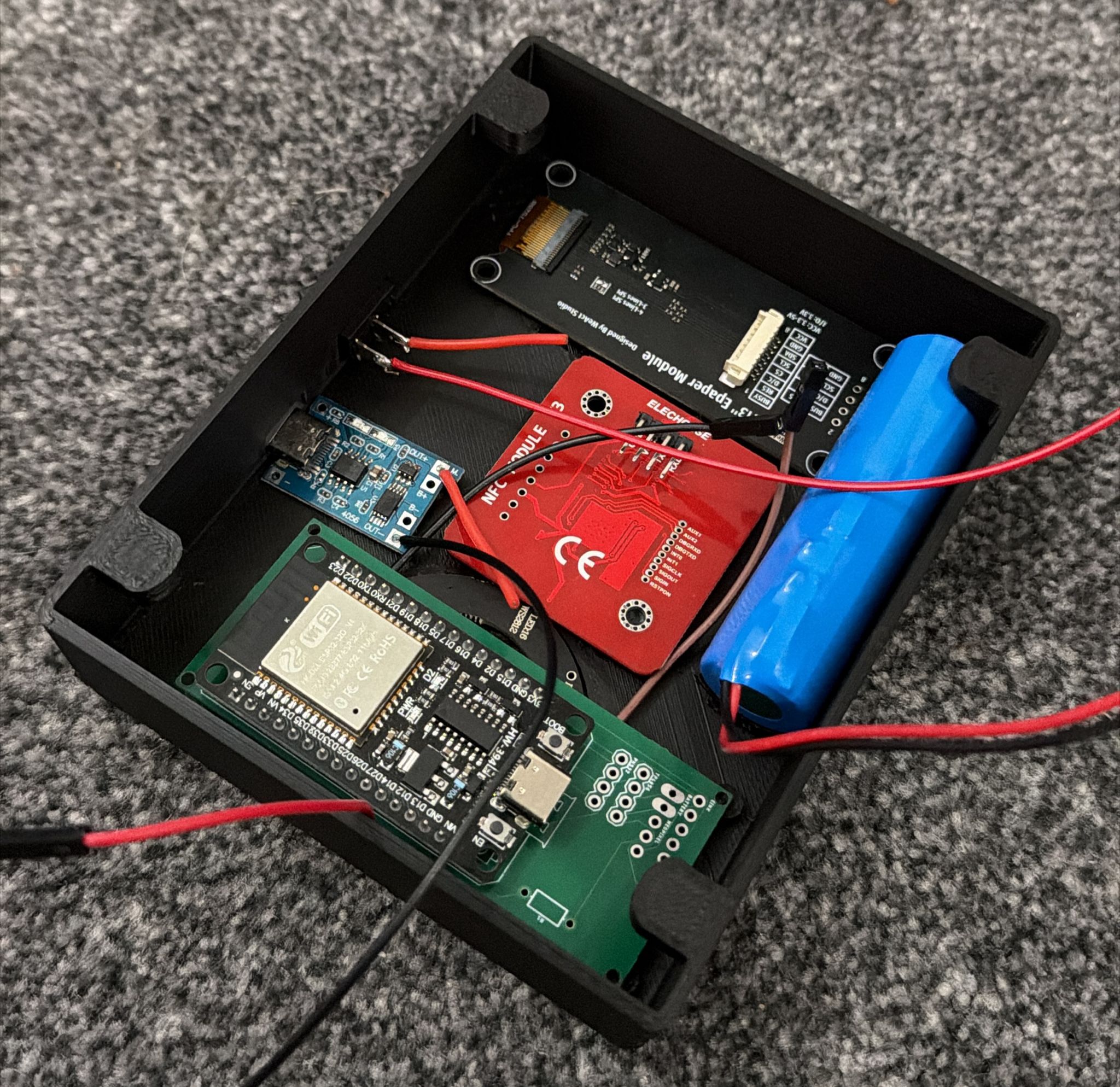
ESP32 Dev Module, Arduino framework, header-only .h files next to one .ino. No PlatformIO, no RTOS, a cooperative non-blocking loop that never parks for more than ~100ms.
Hardware
| Part | Why |
|---|---|
| ESP32 Dev Module | Cheap, WiFi on-board, huge library ecosystem |
| PN532 NFC reader (I2C) | Well-supported via Adafruit library, reads ISO14443A Mifare UIDs |
| Waveshare 2.9" B/W eInk (SPI) | Readable in daylight, zero-power idle (the title stays on the screen when the device is off, which is feature not bug), tiny power draw for a box that's on all day |
| WS2812B NeoPixel ring (16 px) | State feedback at a glance for a toddler and for the parents |
| TP4056 + 18650 Li-Ion | Cheap, standard, safe |
State machine
Five states, server-authoritative where it matters:
UNCONFIGURED ──► CONNECTING ──► BOOTSTRAPPING ─┬─► READY
        ▲                              │       │
        │ (401 from server)            │       └─► SCAN_MODE
        └──────────────────────────────┘
scanMode is a flag the server returns every 30s from /api/device/me, which means tag enrolment is driven by the parent's dashboard (see below), not by anything the device knows how to ask for on its own. The device just obediently switches into capture mode when told.
A couple of things I'm proud of in the firmware
- Cooperative loop, sub-10ms jitter. The button, the LED animation, the NFC poll, the 30s bootstrap, and the 5s charge check all coexist without an RTOS.
LEDRing.update()throttles itself internally; nothing blocks. - TP4056 charge detection by tapping the LED cathodes. TP4056 modules have CHRG/STDBY LEDs driven open-drain through series resistors. Instead of a voltage divider off the 5V rail, the firmware reads the LED cathodes directly through the ESP32's internal 45kΩ pull-ups. No extra parts, no extra board space, just a blob of solder on the correct pad.
- Stateful UID debounce. A single
(lastUID, lastScanTime)pair rather than a ring buffer. If Oakley sits the same disc on the box for ten seconds it plays once, not forty times. - One button does everything. The ESP32 dev board's BOOT button (GPIO 0) is the factory reset. Hold for three seconds, device wipes NVS + WiFi creds, reboots into the captive portal. No physical reset pin protrudes through the case; the button is recessed inside a hole in the enclosure.
One-click pairing
This is the bit of the project I'm most proud of.
First boot with no config → the device comes up as an open WiFi AP called Jellybox-Setup, running WiFiManager's standard captive portal on http://192.168.4.1. It has a /wifisave form endpoint that accepts WiFi SSID and password, plus, because WiFiManager lets you register custom parameters, two extra fields for the Jellybox server URL and the device API key.
The naïve flow is: parent connects their phone to the AP, opens the portal in a browser, types everything in, submits. Four places to mistype a 67-character API key.
The real flow is: the parent clicks "Add new device" in the dashboard. The server mints a fresh API key and returns it to the dashboard JavaScript. The parent is prompted to connect their phone to the Jellybox-Setup AP. The dashboard JavaScript is still loaded in the browser, and as soon as the phone joins the AP, the dashboard detects the device portal is reachable (it pings http://192.168.4.1 every couple of seconds). Then:
// PairDeviceFlow.tsx
const PORTAL_ORIGIN   = 'http://192.168.4.1'
const PORTAL_SAVE_URL = `${PORTAL_ORIGIN}/wifisave`

await fetch(PORTAL_SAVE_URL, {
  method: 'POST',
  mode: 'no-cors',
  body,                                 // SSID, password, server URL, API key
})
The dashboard's JavaScript POSTs directly to the device's captive-portal /wifisave endpoint with every field pre-filled from what the server already knows. Cross-origin, so mode: 'no-cors', which means the dashboard can't read the response, but it doesn't need to; it can watch the server side (/api/devices/{id}/online) for the device phoning home to confirm pairing worked.
From the parent's perspective it's: click Add New Device → enter home WiFi password → done. No QR codes, no Bluetooth BLE GATT dance, no typing an API key on a phone keyboard. The captive portal is still there as a manual fallback if anything goes wrong.
The trick is modest, a cross-origin POST to a known endpoint, under no-cors because we're happy to be write-only. The effect is a pairing flow that feels, for the first time in an ESP32-over-AP product I've used, like a thing that was designed.
The scan-capture trick
Enrolling a new tag is the one interaction that has to involve both the device and the parent. The naïve approach needs a UI on the device. The Jellybox doesn't have one, the eInk panel is read-only to Oakley, and "Jellybox admin mode via a three-year-old's play box" is a bad shape of UX anyway.
The fix: the parent opens "Add new tag" in the dashboard. The server generates a 5-minute capture token bound to the parent's Jellybox device. The device picks it up on its next /api/device/me poll and enters SCAN_MODE. The LED ring goes purple.
The next scan on the device is not played, it's POST /api/play as usual, but the server recognises the capture token and writes the tag UID into a pending slot. The dashboard is polling for that slot to fill; the moment it does, the parent gets a content picker (a modal that browses the Jellyfin library) and assigns a show to the UID they just captured.
Three requests, one timer, no device UI, no typing a 16-byte UID into a form. The device doesn't need to know what it's enrolling, it just reports what it saw during the window.
The enclosure
Designed in Tinkercad, because I'm a 3D-modelling novice and Tinkercad is what I know. Printed on a Creality Ender 3 V3 SE in PLA.
I went through four revisions in Tinkercad before committing any of it to plastic. Only the last one got printed; the first three were measurement and fit fixes, caught on screen before they cost a spool. The hardest constraint:
Thin enough for NFC communication through the case, thick enough for engraved details on the outside, and thick enough that the NeoPixel ring shows through as a diffused glow rather than 16 hot dots.
That compromise is the reason the top shell is where it is. Other constraints, cleanable supports, the 18650 fitting without cracking, the TP4056's USB-C port being reachable for charging, were more mechanical. The NFC/engrave/LED tension was the interesting one.
The STLs are published alongside the firmware as a reference design. The idea is that every user prints their own interpretation. There's a docs page in the server dashboard with an embedded three.js STL viewer so a parent can look at the case before printing.
The tags
Cheap circular NFC tags from AliExpress (NTAG-style, nothing fancy) living inside a 3D-printed disc with a cavity. I've printed variants for Oakley:
- Flat discs with engraved logos (Thomas, the Gruffalo, Hairy Maclary).
- Discs with small figurines on top.
- A planned credit-card-profile variant so a dozen tags live in a trading-card toploader or a binder sleeve, because "a physical thing a child can sort and store" is half of what makes the Toniebox interaction work.
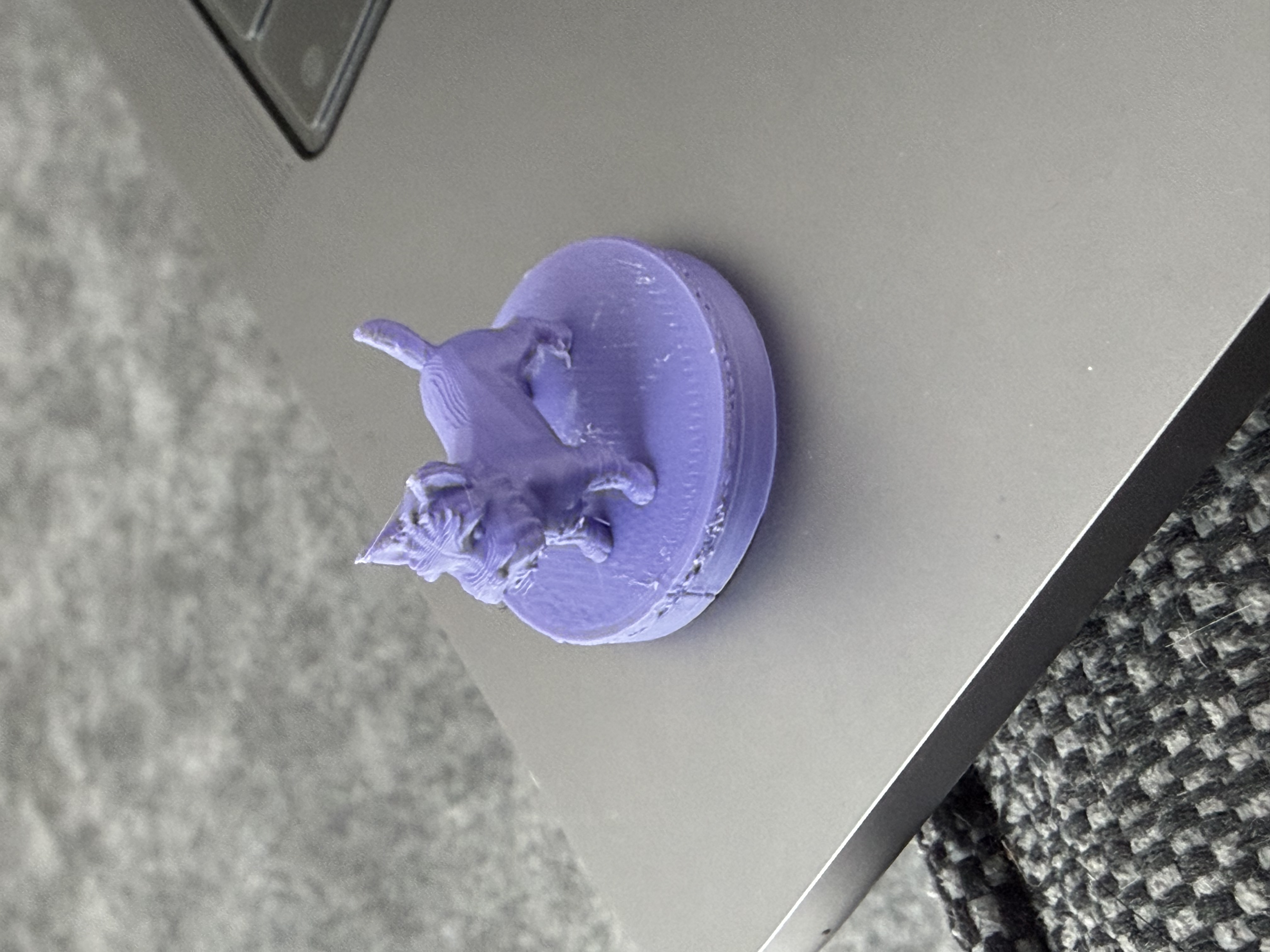
Like the case, tag bodies are meant to be a reference design. The NFC tags are the only bit with a specific part number; the plastic around them is "do what you like."
Security and parental controls
The threat model is Oakley is the user, his parents are the admins, and Jellyfin is the backend. Consequences that shape the design:
- Jellyfin tokens encrypted at rest (AES-256-GCM). Decrypted per-request, not cached in memory.
- Device API keys bcrypt-hashed. Lookup by prefix index, then bcrypt against the small candidate set.
- Per-device rate limit (60 plays / 60s, sliding window) and per-device debounce (5s default), both configurable by the parent.
- Operating hours. Outside the window,
/api/playreturns 403 with a logged reason. Oakley cannot trigger Finding Nemo at 5:45am. (Oakley has tried to trigger Finding Nemo at 5:45am.) - Custom headers on the Jellyfin connection, also encrypted. Means Jellyfin can sit behind Cloudflare Access, Authelia, a reverse proxy, whatever, and Jellybox still works.
- Co-parent partner accounts explicitly can't touch the Jellyfin credential.
- TLS on device is unverified (
client.setInsecure()). A deliberate, documented tradeoff, the bearer API key is the shared secret, the device is low-power embedded and we don't want to ship a CA bundle. Only self-hosted Jellyfin URLs pointed at your own box are expected.
POC → final
Every pillar was built twice.
| Pillar | POC | Final |
|---|---|---|
| Concept | ESP32-CAM + QR codes + ESPHome + Home Assistant. One HA automation per show, fiddly to configure, but it proved the loop: child scans a thing, TV plays a thing. | ESP32 + PN532 + dedicated server + Jellyfin integration. |
| Server | The HA automations above. | Next.js SaaS with dashboard, parent controls, partner accounts, encrypted tokens. |
| Firmware | A throwaway sketch that posted an NFC UID to a single endpoint. | The cooperative loop, the state machine, the captive portal, the eInk screens, the LED animations, the TP4056 charge trick. |
| Enclosure | (none) | Four revisions in Tinkercad, one print in PLA. |
Honest division of labour with Claude
- Server: I wrote the data model, the auth loop, and the add-device flow. Claude built the rest, crucially all of the dashboard UI.
- Firmware: I proved the scan-posts-to-endpoint loop. Claude fleshed out the state machine, the animation layer, and the captive-portal polish.
- Enclosure: All me, in Tinkercad, by trial and error.
Pattern holds across the project: I did the primitives and the product decisions; Claude did the connective tissue. That's a sensible division of labour and it's how this got built to this depth in the time it did.
Why it's not public
Same two anxieties as my other recent projects:
- iPlayarr taught me what it feels like to publish a project and then maintain the issue list.
- The "vibe coding" pejorative is loud enough in 2026 that a kids-focused tool with half its code written by an LLM would invite the wrong kind of review before the right kind.
The instance at jellybox.nikorag.co.uk is open on the internet but not announced anywhere. Every person I've shown it to in person has said it's amazing. That's the sample I'm choosing to trust for now.
What's next
- Battery voltage monitoring. The current firmware reads TP4056 charge state but not battery level; low-battery behaviour is "it turns off." I want a real percentage on the eInk.
- Partial eInk refresh. Currently every update causes a full flash. It's a Waveshare 2.9", partial refresh is supported, I just haven't wired it up yet.
- More tag form factors. The credit-card-profile variant is the next print.
- First non-reference extension. The framework is unproven against a real third-party API. Writing one will tell me what's missing in the contract, refresh-token reconnection UX is the obvious first gap.
- Public release, eventually. When I've had a bit more distance from the iPlayarr maintenance weight, and when I'm ready for the vibe-coding conversation I'd need to have on the way in.
Links
- Server (live): jellybox.nikorag.co.uk
- Server repo: github.com/Nikorag/Jellybox-Server
- Firmware + enclosure repo: github.com/Nikorag/Jellybox-Firmware
next case →
iPlayarr
A companion for the Arr stack that makes BBC iPlayer a first-class citizen in Sonarr and Radarr, by pretending to be two things it isn't.